


You’ve heard the hype. AI is transforming businesses. Everyone is jumping on the trend. But here’s the truth nobody tells you: most businesses use AI in the wrong places.
They chase flashy AI projects that impress their friends but waste money and time. Meanwhile, the real opportunities—the ones that would genuinely save hours of work, reduce errors, and boost revenue—sit hiding in plain sight.
This guide is different. Instead of selling you another “AI revolution” story, we’ll show you exactly how to find where AI actually makes sense for your specific business. No jargon. No tech-speak. Just a straightforward process any business owner can follow in about 30 minutes.
The Reality Check: Why Most AI Projects Fail
Before we jump into solutions, let’s talk about why so many businesses end up disappointed with AI.
According to the latest 2025 research, 92% of small businesses have integrated AI into their operations—a dramatic jump from just one-in-five in 2023. But here’s the catch: many of these implementations were reactive, not strategic. They adopted AI because it was trendy, not because they mapped their actual pain points.
The result? Expensive tools that don’t solve real problems. Teams confused about how to use new systems. Technology sitting unused.
But some companies that took a different approach—those that first identified where AI could genuinely help, then picked the right tools—have seen remarkable results. Their employees save an average of 5.6 hours per week. Their teams feel more excited, not more threatened. And most importantly, they’re actually seeing ROI.
The difference is strategy. And that’s what we’re going to give you today.
Here’s a hard truth from the data: Small business workers save 5.6 hours per week using AI on average, but only when they’re using AI with right strategies.
The 3-Step Framework: Find Your AI Goldmine
The process isn’t complicated. Think of it like treasure hunting. You’re looking for specific, hidden spots where AI can change your business immediately.
Step 1: Map Your Annoying Tasks (10 Minutes)
Before searching for AI opportunities, you need to list the tasks that actually drain your time and energy.
Start here: What work makes you (or your team) want to quit?
Not because the work is hard—but because it’s repetitive, boring, and feels like it shouldn’t require human intelligence.
Grab a pen or open a notes app. Write down 5–10 tasks that:
- Happen over and over (daily, weekly, monthly)
- Feel like they take forever
- Are mostly data entry, writing, copying, or answering the same questions
- Cause mistakes when done manually
Here are real examples from actual businesses:
| Business Type | Annoying Task | Time Lost |
|---|---|---|
| Coaching business | Summarizing client notes after each session | 30+ min/week |
| Small e-commerce shop | Answering “What are your hours?” / “Do you ship internationally?” | 2-3 hours/week |
| Freelance consultant | Turning voice notes into cleaned-up proposals | 3-4 hours/week |
| Service provider | Creating quotes for each client inquiry | 1-2 hours/week |
| Marketing agency | Writing email subject lines and ad copy variations | 4-5 hours/week |
The key insight: Look for patterns. If you’re doing the same thing three times a week, AI might automate it. If you’re copying data between tools, AI can probably connect them. If you’re answering the same question repeatedly, AI can handle it.
Step 2: Run the 3-Question AI Fit Test
Not every annoying task is right for AI. Some require human judgment. Some need a real relationship. Some are already efficient enough.
Take each task from your list and answer these three questions:
Question 1: Is it repetitive?
Does this task happen multiple times per week/month, following a similar pattern each time? Yes = Good AI candidate. (One-off tasks? Probably not worth automating.)
Question 2: Is it mostly text, numbers, or simple rules?
Does the task involve writing, summarizing, analyzing data, following a checklist, or making simple categorizations? Yes = AI excels here. (Tasks that require deep human intuition, complex emotional judgment, or real relationship-building? Harder for AI alone.)
Question 3: Would faster or more accurate work clearly help the business?
If this task was done 10x faster or 100% accurately every time, would it meaningfully impact revenue, customer happiness, or team sanity? Yes = Worth the effort.
If you get “YES” to at least 2 of these 3 questions, you’ve probably found an AI opportunity.
Let’s test this framework with real examples:
| Task | Repetitive? | Text/Data/Rules? | Clear Impact? | AI Fit |
|---|---|---|---|---|
| Answering customer support FAQs | ✓ Yes | ✓ Yes | ✓ Yes | 🟢 Strong |
| Transcribing meeting notes | ✓ Yes | ✓ Yes (audio→text) | ✓ Yes | 🟢 Strong |
| Drafting first-pass email responses | ✓ Yes | ✓ Yes | ✓ Yes | 🟢 Strong |
| Categorizing expenses in accounting | ✓ Yes | ✓ Yes (data) | ✓ Yes | 🟢 Strong |
| Building deep client relationships | ✗ No | ✗ No (relationship-based) | ? Unclear | 🔴 Poor |
| Complex product design decisions | ✗ No | ✗ No (creative + judgment) | ? Unclear | 🔴 Poor |
| Data entry from invoices to spreadsheet | ✓ Yes | ✓ Yes (data) | ✓ Yes | 🟢 Strong |
You’ll notice a pattern: AI thrives on repetitive, data-driven, rule-based work. It struggles with ambiguous, one-of-a-kind, deeply creative, or relationship-critical tasks.
Step 3: Score and Prioritize (Value vs. Effort)
Now you have a shortlist of potential AI opportunities. But which one should you tackle first?
Here’s where prioritization saves you from chasing your tail.
Create a simple 2-by-2 grid:
- Y-Axis: Value (How much would automating this actually help? Rate 1-5)
- X-Axis: Effort (How hard/expensive would it be to set up? Rate 1-5)
Your goal: Find ideas in the top-left corner—high value, low effort.
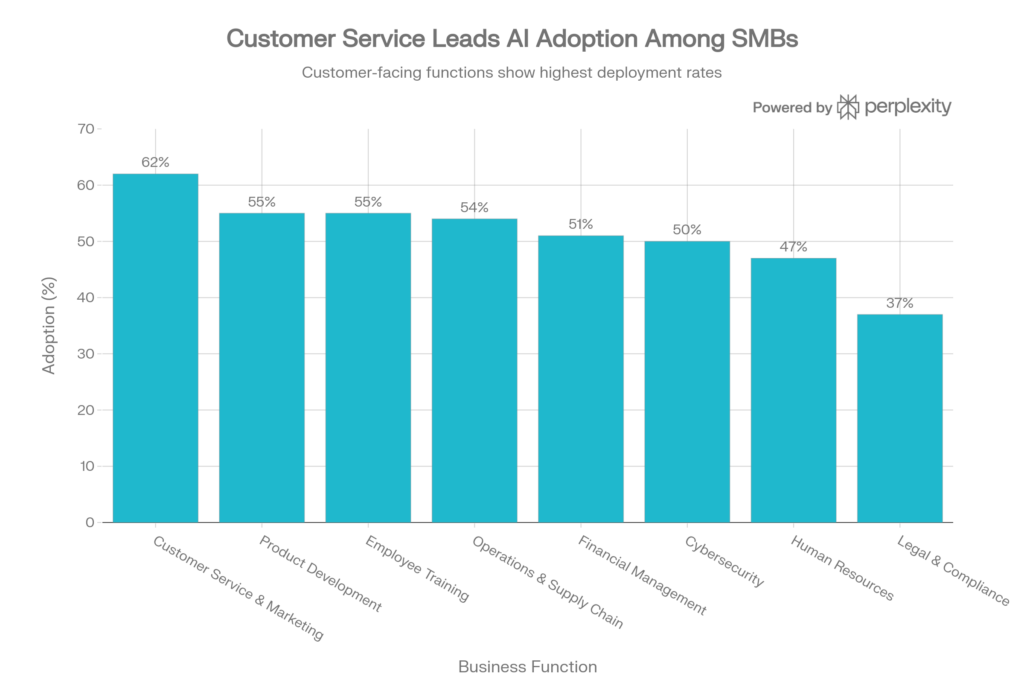
AI deployment spans across all business functions, with customer service (62%) leading but spreading rapidly into operations, HR, and finance
Example scoring:
| Opportunity | Value (1-5) | Effort (1-5) | Priority |
|---|---|---|---|
| Automate customer FAQ responses | 5 | 2 | 🟢 Do first |
| Set up automated invoice processing | 4 | 3 | 🟡 Do second |
| Build AI chatbot for complex sales calls | 5 | 4 | 🟡 Do later |
| Transcribe meetings with AI | 4 | 1 | 🟢 Do first |
| Analyze customer feedback for trends | 3 | 2 | 🟡 Do second |
| Fully replace your customer support team | 3 | 5 | 🔴 Skip this |
See the difference? The winners are the ones with high value but low friction to get started. Those are your quick wins. Those are what create momentum.
What’s Actually Happening: AI in Real Businesses (2025 Data)
Before you jump into implementation, it helps to see what’s actually working for other businesses.
Here’s what the latest data shows about where AI is creating real impact:
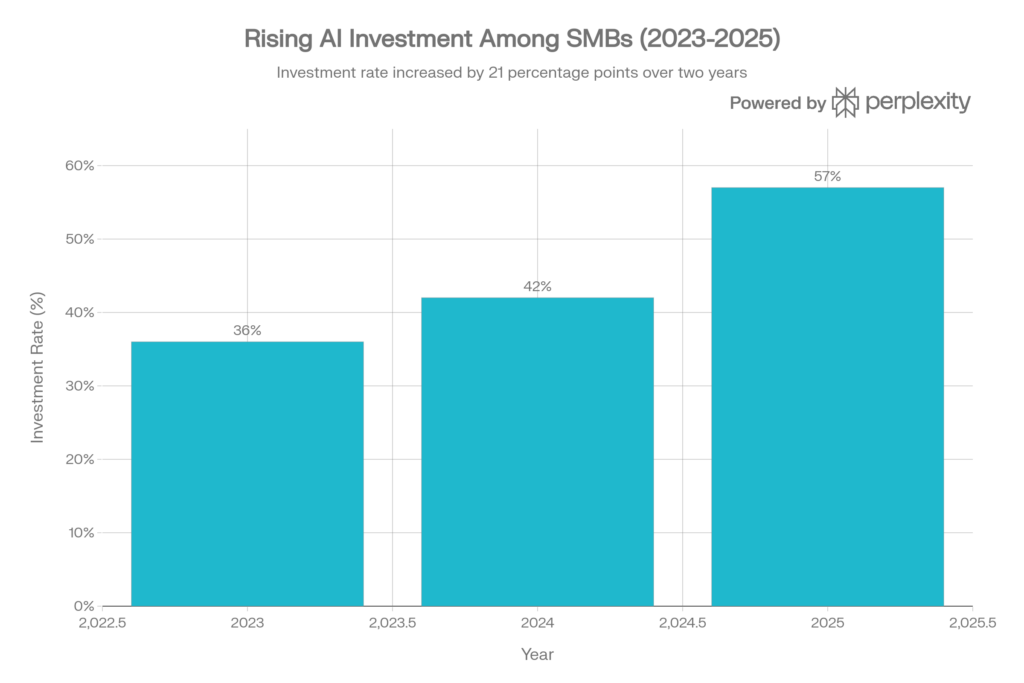
Small businesses have dramatically increased AI investment, growing 58% in just two years from 36% (2023) to 57% (2025)
The momentum is real. Small businesses are investing in AI at unprecedented rates. But they’re being strategic about where they’re investing.
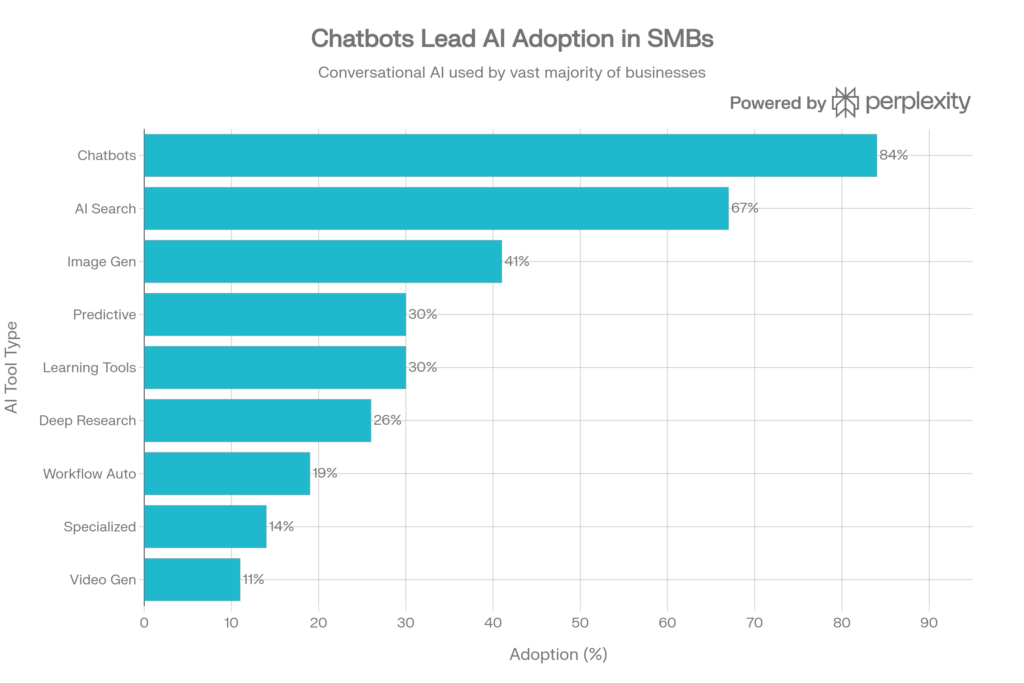
Chatbots dominate AI adoption (84%), but SMBs are expanding into advanced tools like predictive analytics and workflow automation
Notice that chatbots (84% adoption) dominate because they solve a universal problem: repeated customer questions. But look at the spread—workflow automation (19%), learning tools (30%), and predictive analytics (30%) are growing fast because they’re moving beyond just “being smart” and into “actually changing how we work.”
And here’s the breakdown of where these tools are deployed:
AI deployment spans across all business functions, with customer service (62%) leading but spreading rapidly into operations, HR, and finance
Customer service and marketing lead (62%) because those are the most obviously repetitive. But notice: operations (54%), finance (51%), even HR (47%) are now AI-powered. This tells you something important: AI opportunities exist everywhere, not just in customer-facing departments.
The 7 Business Processes Most Ready for AI (Right Now)
If you’re still not sure where to look, here are the seven areas where AI is already proven to work in small and mid-sized businesses:
1. Customer Support & Service
The Problem: Answering the same questions 100 times per week is mind-numbing.
The AI Solution: Chatbots handle FAQs, ticket routing, and basic troubleshooting. Complex questions escalate to humans.
Time Saved: 2-5 hours/week per support person
Tools to Consider: Botpress, HubSpot, Nextiva
2. Sales & Lead Follow-Up
The Problem: Sales reps spend 40% of their time on admin instead of selling.
The AI Solution: AI automatically logs interactions, drafts follow-up emails, predicts deal likelihood, and surfaces next steps.
Time Saved: 3-7 hours/week per rep
Tools to Consider: HubSpot, Salesforce (with AI), ChatSpot
3. HR & Recruitment
The Problem: Screening 100 resumes takes forever. Interview scheduling is a nightmare.
The AI Solution: AI parses resumes, ranks candidates by fit, schedules interviews automatically, and onboards new hires with personalized training.
Time Saved: 4-6 hours/week per HR person
Tools to Consider: Workday, LinkedIn Recruiter, Ashby
4. Finance & Accounting
The Problem: Invoice processing and expense categorization feel like time-travel work.
The AI Solution: AI extracts data from invoices, matches them to bank statements, auto-categorizes expenses, detects fraud, forecasts cash flow.
Time Saved: 5-8 hours/week per accountant
Tools to Consider: QuickBooks, Zoho Books, Concur
5. Marketing & Content
The Problem: Creating dozens of emails, social posts, or ad variations monthly is exhausting.
The AI Solution: AI drafts marketing copy, optimizes for SEO, generates social captions, creates email variations, personalizes offers by segment.
Time Saved: 6-10 hours/week per marketer
Tools to Consider: Jasper, HubSpot, Buffer, Notion AI
6. Operations & Supply Chain
The Problem: Demand forecasting and inventory management are guessing games.
The AI Solution: AI predicts demand using historical data, optimizes inventory levels, plans routes, predicts maintenance needs.
Time Saved: Hours of manual analysis; immediate insights
Tools to Consider: Shopify (with AI), SAP, Blue Yonder
7. Data Analysis & Reporting
The Problem: Creating monthly reports feels like pulling teeth.
The AI Solution: AI pulls data, creates visualizations, flags anomalies, generates insights automatically.
Time Saved: 3-5 hours/week per analyst
Tools to Consider: ThoughtSpot, Power BI, Tableau, Google Analytics (with AI)
Key insight: These seven areas cover most of the work humans do in small businesses. Somewhere in this list is an opportunity that fits your business.
Red Flags: When AI Is NOT the Right Answer
Here’s what the data also shows: 45% of small business workers worry about adopting too much AI, and 39% question whether their business actually needs as much AI as industry trends suggest.
They’re not wrong to be skeptical. AI isn’t always the answer. Here are situations where you should not implement AI:
| Red Flag | Why It Doesn’t Work |
|---|---|
| The task needs deep relationship-building | AI can’t replace genuine human connection |
| The task happens once or twice a year | Setup cost won’t be worth it |
| Your employees are terrified of job loss | Forcing AI without buy-in causes chaos |
| The task involves nuanced judgment calls | AI might make confident but wrong decisions |
| Your data is messy, incomplete, or unreliable | “Garbage in, garbage out”—AI will amplify bad data |
| You have no idea how you’ll measure success | You can’t track ROI if you don’t define it first |
| Your current process is already fast and error-free | Don’t optimize what isn’t broken |
The most successful companies aren’t those that use the most AI. They’re the ones that use AI strategically—solving real problems, not chasing trends.
Your 30-Minute AI Opportunity Audit (DIY Blueprint)
Enough theory. Let’s make this practical.
Here’s an exact process you can run right now, this week, to identify your AI opportunities:
Time Required: 30 minutes solo, or 45 minutes with your team
Phase 1: Discovery (10 minutes)
- Open a Google Doc or Notion page titled “AI Opportunity Audit”
- List 5–10 tasks your team complains about, wastes time on, or says “this is so tedious”
- For each task, note: How often it happens, who does it, how long it takes weekly
Example:
- Weekly status report writing: Maria does it, takes 2 hours
- Customer inquiry emails: Team of 3, each spends 1 hour/day answering repeats
- Invoice data entry: Accounting, 3 hours per week
Phase 2: Screening (10 minutes)
- Go through your list with the “3 Questions” framework
- Mark each task: 🟢 Good AI fit, 🟡 Maybe, or 🔴 Not ready
- Keep only the 🟢 and 🟡 tasks for Phase 3
Phase 3: Prioritization (10 minutes)
- For your remaining tasks, estimate Value (1-5) and Effort (1-5)
- Plot them on a simple grid, or just rank them by “Value – Effort”
- Pick your #1 priority—the one with highest value and lowest effort
Phase 4: Quick Win (Optional, this week)
- For your #1 priority, pick one simple tool: ChatGPT, Zapier, Canva, or Otter.ai
- Test it for one week with a small part of the task (not full rollout yet)
- Track how much time you save, what works, what doesn’t
- Share results with your team
That’s it. You’ve just done what most businesses never do: strategically identified where AI fits your business.
The Real AI Opportunity: Reclaim Time for High-Value Work
Here’s why this matters beyond just saving hours.
The average small business worker saves 5.6 hours per week using AI in the right places. That’s 290 hours per year. For a three-person team, that’s equivalent to hiring an extra full-time employee—without the salary.
But there’s something even more valuable: When humans stop doing repetitive drudgework, they start doing the thinking work that actually drives business growth.
Your customer support person, instead of answering “What are your hours?” for the 500th time, can actually listen to what customers really need.
Your accountant, instead of data entry, can do cash flow forecasting and growth planning.
Your marketer, instead of churning out generic social posts, can develop real strategy.
This is the real opportunity: using AI to free your best people to do their best work.
That’s not hype. That’s strategy.
What Tools Should You Actually Use? (The Simple Answer)
If you’re thinking, “Okay, I found my AI opportunity, but which tool do I pick?” here’s the simple approach:
Start with free or cheap tools first. You don’t need an enterprise solution to test an idea.
| Use Case | Best Tool | Cost | Time to Setup |
|---|---|---|---|
| Answering repeated questions | ChatGPT + Zapier | Free to $25/mo | 30 minutes |
| Transcribing meetings | Otter.ai | Free tier available | 5 minutes |
| Summarizing documents | NotebookLM or ChatGPT | Free | 5 minutes |
| Automating workflows | Zapier | Free tier available | 1-2 hours |
| Creating marketing copy | Jasper or ChatGPT | Free to $59/mo | 30 minutes |
| Managing finances | QuickBooks | $17.50/mo+ | 1 hour setup |
| Customer support chatbot | Botpress | Free tier available | 2-4 hours |
| Content design | Canva | Free tier available | 30 minutes |
Pro tip: Most of these have free tiers. Test for a week before committing money. If it saves you 5 hours in a week, you’ve already paid back any subscription cost.
The Bottom Line: Your Next Move
You now have everything you need to identify the right AI opportunities in your business. Not the hyped ones. Not the ones that impress your friends. The real ones that solve your actual problems.
Here’s what to do next:
This week:
- Spend 30 minutes running your AI Opportunity Audit (use the framework above)
- Pick your #1 priority—high value, low effort
- Choose one free tool to test for one week
Next week:
- Run your small pilot test
- Measure time saved, errors reduced, or improvements made
- Share results with your team (skeptics become believers when they see data)
The week after:
- If it works, expand it to your full team or full process
- Repeat this audit quarterly to find your next AI opportunity
The businesses that win in 2026 won’t be the ones with the most AI. They’ll be the ones that strategically picked the right opportunities, started small, measured results, and kept their teams excited instead of terrified.
That can be your business. You now have the roadmap.
Key Takeaways to Remember
✓ AI is best at repetitive, data-driven, rule-based work—not judgment calls or relationship-building
✓ Small businesses are already saving 5+ hours per week using AI—but only when they target the right opportunities
✓ The 3-Question framework (Repetitive? Text/data? Clear impact?) works for any business to spot AI candidates
✓ Prioritize by Value vs. Effort—find quick wins first to build momentum and team buy-in
✓ Test with free tools first—don’t invest in enterprise software until you know it works
✓ The real opportunity isn’t replacing humans—it’s freeing humans to do work that matters
✓ Start with your annoying tasks, not industry trends—AI that solves your actual pain is AI that creates ROI
Questions? Share your AI opportunity audit results in the comments. We’d love to hear what you discover about your business.
This guide was built on data from 1,000+ SMB workers (2025-2026), insights from business leaders across industries, and over 50 sources on AI implementation in small business. Everything here is battle-tested in real companies.